Counter service
The Service Counter is where your lobby meets the public. Your clerks sell stamps and retail there and take in the letters and parcels customers bring. It is a station in the Customer Service zone. It does not need power, but it does need a clerk on the floor and enough desk light to read by.
Lobby hours
You set the hours in Operations: Policy, on the Lobby hours card. Pick Opens and Closes. Open at 00:00 and close at 24:00 to stay open all day and night. The table shows the default.
| Window | Hours |
|---|---|
| No walk-in customers | Before the kiosk opens (07:00). Only staff and trucks come in. |
| Service counters | 08:00 to 17:00. |
| Auto postage kiosks | One hour wider on each side: 07:00 to 18:00. |
New counter customers only show up while three things are true: the counter is open, there is a Service Counter that offers at least one service, and a clerk on the floor can work that station. Sales also stop if every customer-facing desk is too dark to read, so keep the desks your customers use well lit.
Walk-ins follow the time of day. Midday is busiest, and the small hours bring only a trickle. Your clerks' own working hours have to cover the lobby window. If they do not, the counter stays unstaffed and only self-service runs.
At closing time, people already in line or being served may finish while the light still allows it. Anyone else is sent out. Clerks stay on to close out while those customers still need them. Mailbox drop-off and Private box pickup can carry on after the counter window while the building is otherwise open, but not before the kiosk opens, one hour before the counter (07:00 by default).
How many customers come
Customers walk in from every town your road reaches. A small office with one connected town sees a few dozen visitors a day.
More come when:
- More towns are connected by road (Operations: Regions).
- Those towns get their mail on time. A town with a high service score sends more customers. A town with a low score still sends a few.
- Government Satisfaction is high.
- The weeks go by. Traffic grows slowly after the first two weeks.
- The Service Policy is Community. Premium keeps the lobby quieter.
A Service Counter only serves customers while a clerk works it. If your clerks are all on the dock, the window sells nothing. Some visitors come to rent a Private box, and fewer try when customer satisfaction is low.
Queue
The line is first in, first out. Someone still walking in is not given a window yet. Each customer lines up at a counter that offers what they need. A free counter takes the oldest waiting customer it can serve. A busy window, or one that does not offer what they need, is skipped. Old queue entries are dropped, so a counter cannot get stuck on one forever. While customers are waiting, counter work comes before a clerk's other jobs.
If no counter can serve the visit, the customer leaves. The speech bubble reads "No counter here offers Money orders. I will go elsewhere.", with the missing service names in place of Money orders. Several names are separated by a comma and a space. If the visit cannot be named, it reads "No counter here offers what I need. I will go elsewhere." The ticks and how a customer picks a counter are on Counter services.
What the window sells and accepts
- Stamp sheets, whenever the counter is open, that counter has enough sheets, and a clerk finishes serving at the window. The stock sits on the Service Counter itself. The Auto Postage kiosk can sell sheets without a clerk. It uses its own sheets, and a clerk restocks it from the Stamp Safe.
- Extended retail, once the counter offers drop-off: envelope packs, shipping boxes S, M, and L, packing tape, money orders, and proof-of-mailing. Passports are not sold at this window. Families apply for them at a Passport Station. See Passports and Counter services.
- Private box rental, when the counter is open, that counter has Private box rental ticked, a Private Box Wall is placed, and a box is free. A new counter has that tick. The counter charges $15.00, which covers the first day. Each later day is $2.50. The Auto Postage Machine does not rent boxes. See Private boxes.
- Letters and parcels the customer carries in, when you have an Outgoing Mail Bin and outbound trucks on the dock clock. Those trucks only come if you have a loading dock.
- Box mail is not handed across this window. The named renter collects it at the Private Box Wall and pays a pickup fee of $6.00 in the default currency, only when mail comes out. See Private boxes.
Counter services
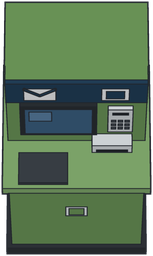
Each counter can offer a different set of services, and customers only line up where their whole visit can be served. Click a placed Service Counter to choose. The window title is "Counter services". The corner button reads "X", and its tip is "Close". Drag the title bar. The tip is "Drag to move", or "Pinned: Position locked" when the pin is on. These ticks are per counter. They are not on Settings: Sandbox.
Under the title: "Tick what this counter offers. Customers only line up here for ticked services, and clerks only serve those." The ticks, in order, are "Stamps and postage", "Packages", "Money orders", "Proof of mailing", and "Private box rental". A new counter has every one ticked. "Reset to default" puts that same set back.
Some ticks are shown but cannot be changed until the facility is ready. "Packages", "Money orders", and "Proof of mailing" share the line "This opens once an outgoing bin and an evening truck are in place." "Private box rental" reads "Private box rental opens once a private box wall is placed." A locked tick stays at the new-counter setting until its line is gone. "Stamps and postage" is never locked. With nothing ticked, the window adds "Nothing is ticked, so this counter serves nobody. Tick at least one service." If every counter is like that, no new counter customers come in.
What each tick covers
"Stamps and postage" covers stamp sheets, envelope packs, packing tape, and a letter the customer hands over. "Packages" covers shipping boxes S, M, and L, and a parcel they hand over. A parcel still needs a Scanner Bay. "Money orders" and "Proof of mailing" are those sales. "Private box rental" is the rental at this window.
Customers only ask for money orders, proof of mailing, or a box rental while some counter has that tick. They ask for stamp sheets and parcels either way. Envelopes, boxes, tape, money orders, and proof of mailing stay out of the basket until an outgoing bin and an outbound truck are in place. Until then the basket is stamp sheets only.
Which counter a customer picks
A letter drop-off, a parcel drop-off, or a private box rental has to be offered by the same counter as the rest of that visit. A counter missing one of those is skipped. A retail item that counter does not sell is simply dropped from the basket, and the rest of the visit can still go ahead.
Among the counters that can serve the visit, the one that covers more of it wins. A tie goes to the shorter line, where a busy window counts as one extra person. A further tie goes to the nearer counter.
When no counter can serve them
If no counter can serve the visit, the customer does not line up. The speech bubble names what is missing: "No counter here offers Money orders. I will go elsewhere." Several names use a comma and a space, as in "No counter here offers Stamps and postage, Packages. I will go elsewhere." An unnamed visit reads "No counter here offers what I need. I will go elsewhere."
The notice is titled "Customer left without service". The body reads "A customer left because no counter offers Money orders. Open a counter and tick it to serve that request.", with the missing names in place of Money orders. You see the same missing list once each day.
These customers leave as a walkout, and it costs you. Customer satisfaction takes the usual walkout loss of 3, before service policy and the postmaster. The town they came from loses 2 on that day's service-score adjustment, the same as any other failed counter visit. That day's adjustment stays between -20 and 20. If the notice keeps naming the same service, tick it on a counter.
Parcel rule
The counter only takes in parcels once a Scanner Bay is placed. Letters and flats are still accepted without one. Hover the Service Counter when no bay is down and it adds "Packages need a Scanner Bay". The bay belongs on a Sorting Floor or Distribution Floor. Who is holding a scanner is on Handheld scanners.
Handheld scanners
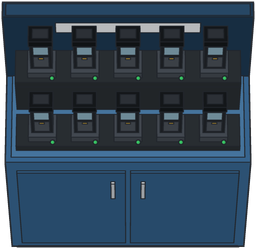

Your clerks need a handheld scanner for Package Sort, and your carriers need one for each street trip. Scanners live in Scanner Bays. Each bay holds 10, and your stock is the number of placed bays times 10. A bay that is not down yet does not count.
Hover any Scanner Bay and the first line reads, for example, "Scanners in stock: 7 of 10". The first number is how many are not checked out. The second is the shared total across all bays, not 10 for that one bay. If nobody is carrying one, that is the only line. If someone is, the next line is "Out with: " and up to four names, with commas between them. More than four ends with a space, a plus, and how many names were left off, as in " +2".
Hover a person who is carrying one and the tip adds "Carrying: Scanner". That tip is hidden once they are home. The bay line still names a carrier who clocked out holding one.
Clerks
A clerk checks a scanner out before Package Sort. While they walk to the bay, the activity line reads "Getting scanner". Only one clerk walks to a bay at a time. They hand it back when they clock out and reach home, so each shift they fetch one again. A clerk manager or a clerk union boss does the same if they are holding one.
A clerk who is still on duty keeps their scanner. A strike does not send them home, so it does not take the scanner back. The end of the day does not collect scanners on its own, and a night clerk still on duty keeps theirs. Firing a clerk leaves the scanner out until they reach the exit and leave the roster. A quit removes them at once, and the scanner is back in the count immediately. Loading a save hands back a scanner still held by a clerk, clerk manager, or clerk union boss who is off shift. Someone still on shift keeps theirs.
Carriers
A carrier checks one out before a street trip, along with the "Drop box key" and the "Vehicle key", and keeps it through the trip. They still have it when the trip ends, so the next trip does not walk to the bay again. Clocking out while loading a truck, or already on the way out, leaves the scanner with them. Clocking out while still on site, walking to the bay, the key rack, or the cage, cancels that trip and puts the scanner back with the keys. A carrier manager and a carrier union boss follow the carrier rule.
When there are not enough
When none are free, the activity line reads "No free scanner". A notice titled "Scanner" reads "All " the total, then " scanners are checked out. Each Scanner Bay holds 10; add another bay for more." That notice waits 30 seconds before it can show again. If you see it often, place another bay.
With no bay at all, the activity line reads "Need Scanner Bay", and the notice titled "Scanner" reads "Place a Scanner Bay so staff can check out scanners." Clerks and carriers both raise it, at most once every 30 seconds. Operations: Status lists the same line under Issues. See Government.
A Scanner Bay needs power, unlike the counter. A bay with no power hands out no scanners and shows red lights. Clerks wait with "Scanner Bay needs power", and carriers get a notice. A manual package scan that cannot check one out shows the notice titled "Scanner" and "Place a Scanner Bay so staff can check out scanners." If more scanners are out than the bays hold, nobody new can check one out until some come back. The people already carrying them keep them.
Where the mail goes next
Customers carry their letters and packages in their hands, where you can see them. A large car load borrows an empty letter tray, canvas hamper, or route bin, fills it at the car, and brings it back. The clerk charges postage, then carries that load to an Outgoing Mail Bin in Customer Service.
Hub mail stays in that bin until an empty tray rack is on the dock. A clerk does not make one. The notice is titled "Outgoing mail needs a tray rack". Local mail goes into facility sort. In a distribution center the bin goes into facility sort instead of calling the outbound truck. See Outgoing mail.
Service grades
The counter has no grade of its own. The daily government grade (processed, delivered, backlog, labor, budget, satisfaction, mail quality) covers the whole facility, and Sundays waive it. A dark or unstaffed counter shows up as missed customers and lower satisfaction, not as a line of its own.