Traffic
Your road is how trucks, buses, staff cars and customer cars reach your facility. This page covers how roads work, who gives way at a junction, where cars and trucks park, and how the bus brings in staff and customers.
Roads are seven tiles wide: a sidewalk band on each outer edge, drive lanes, and a centerline. The first road that still touches a map edge unlocks the town connection and most of the build catalog, so that road comes before anything else.
Intersection rules
Intersections have no signs. Every driver follows one of two right-of-way rules, and you choose which. Settings calls the control Traffic rule. The choices are:
| Setting | English label | What drivers do |
|---|---|---|
| Auto | Auto (follows language) | Four-way stop, unless the language gives priority to the right. Then it is right before left. |
| All-way stop | Four-way stop | Everyone stops at the crosswalk edge and goes in the order they arrived, one vehicle at a time. |
| Right before left | Right before left | Give way to the approach on the driver's right. No stop when that side is empty. If every approach is blocked by the one on its right, the vehicle that has waited longest goes, so the junction cannot gridlock. |
Auto is the default. The help line reads "Unsigned intersections. Auto uses a four-way stop, or right-before-left when the language gives priority to the right."
Both rules share one intersection box. A vehicle holds the box until its cab and trailer have both left it. A grant that gets stuck expires, so the next vehicle can take a clear box.
Trucks at the loading dock
A truck reverses into a loading dock, and it needs straight road to do it. If the Loading Dock tool is selected and no stretch has enough straight pavement for that back-in, the notice is titled "Loading Dock" and reads "No valid spot for a loading dock. Your road does not have enough straight pavement for a truck to reverse in. Extend it in a straight line past both ends of the dock." Plan a long straight stretch of road where your docks will go. See Placement guides.
When a truck backs into a loading dock, a backup beep repeats from the start of the back-in until the trailer is parked, even if the truck pauses partway. Pulling forward before the back-in is quiet, and so is sitting parked. On the way out, the beep plays only while the truck is actually reversing. Vans, trucks and buses beep when backing up. Cars, staff cars included, stay quiet.
A delivery truck, a mail semi or a postal truck that has been rolling plays one hydraulic brake hiss when it comes to rest in a live loading-dock seat. The hiss is one of four takes, and the pick skips the take that truck just used. While the truck stays stopped in that seat, the hiss comes back about every 8 to 15 seconds. A truck already sitting in the seat stays quiet until it rolls away and seats again. A stall, a queue, a junction and a stop on the road stay quiet. Vans, buses and cars do not use this hiss. Rolling again, or leaving the seat, cuts the hiss off.
German and rechts vor links
German (de) is one of the languages that uses right before left when Traffic rule is Auto. The German setting label is "Rechts vor links". The same Auto rule also applies to French, Italian, Spanish, Polish, Norwegian, Swedish and Russian, plus region codes such as AT, CH and LI. Brazilian Portuguese in this game stays on the four-way stop. Whatever your language, you can force either rule in Settings.
German does not turn on left-side traffic. That is a separate checkbox, Left-side traffic, and it is off by default. Checking it flips the lanes, the dock approach and the driver doors. It also mirrors the yield: priority comes from the driver's left instead of the driver's right.
Who follows the rule
Lane vehicles do: mail semis, postal trucks, vans, buses, staff cars, and customer cars on parking trips. A truck, bus or car you are driving is still a lane vehicle, so the same rule applies to you. See Possessing staff.
People on foot do not use the intersection box. Pedestrians walk the sidewalks and cross the asphalt only at the marked crosswalks on intersections and cul-de-sac bulbs. There is no paint tool for a zebra crossing in the middle of a block. Road vehicles stop for people on, or waiting at, those marked crossings.
Vehicle names
Click a truck, van, bus or car to open its inventory. The title includes the vehicle number. When that number is 62, the titles read "Mail truck 62", "Outbound mail truck 62", "Recycling truck 62", "Garbage truck 62", "Construction truck 62", "Postal truck 62", "Delivery van 62", and "Bus 62". A driver's name does not replace a truck, van or bus title. A named car reads that person's name and then "'s car". A car with no name reads "Car". A staff car has no inventory panel. Hover shows these same titles.
Tray racks for the outbound truck
Clerks do not make a tray rack out of nothing for the outbound truck. Counter mail waits in the Outgoing Mail Bin until an empty tray rack is on the dock. The notice is titled "Outgoing mail needs a tray rack". The outbound truck called for the bin may drop off one empty tray rack, and clerks fill that. Keep an empty tray rack on the dock and counter mail can go out on time. See Outgoing mail.
Staff and customer parking
Staff who drive and customers who drive both need a stall. A parking zone has to touch a road.
Staff and customer cars pull into a stall as soon as that stall's entry cell is free. The timer that spaces out other traffic does not hold them back. If the entry cell is taken, or no stall is free, the car does not go in. Postal truck and big-rig stalls still back in.
A customer car can bring up to four customers, each with an errand of their own. The car waits until everyone is back in. An open convertible carries at most two. Business Bay drop-offs and Business Bulk Ledger visits always come alone, in their own car.
About one car in eleven is a taxi. A taxi drops its customers in a customer stall and drives away. When they are done, they walk back to where they got out and wait, and one taxi comes back for the whole group. If none can come within 2.5 game hours, for example when every customer stall is full, they walk home. Staff never come to work by taxi.
Drive aisles
A stall is only useful if a car can drive to it. Cars drive only on open lot asphalt. They never cut through another stall or a parked car, and they only enter their own stall.
Every car stall needs a drive aisle at least 2 tiles deep, straight out from its open edge, and that aisle must connect over open lot asphalt to the road. Any lot direction and any stall facing works, including stalls parallel to the road in a lot that runs inland.
While a car stall tool is selected and Show placement guides is on, the aisle the stall needs is ghosted in front of its open edge, 2 tiles deep. The ghost is cream when the aisle is open and red when it is blocked. Show placement guides is on by default under Settings: Graphics. With the guides on, a stall with no aisle turns red and reads "No drive aisle to this spot". A placed stall keeps a red frame and that note until an aisle opens.
If the open edge does not have 2 tiles of road or lot aisle, the click is refused. A customer stall says "Needs aisle or road clearance for a customer stall." An employee stall says "Needs aisle or road clearance for a parking space."
The common causes are a full row of stalls walling off the back of the lot, or a stall facing a 1-tile strip. When you lay out rows of stalls, leave the aisle in front of each row open.
Truck stalls
A postal truck stall and a big-rig stall ghost the space a truck needs to maneuver in front of the open edge, the same way, when Show placement guides is on. A postal truck stall uses 3 tiles. A big-rig stall uses 4. Open space is cream. A blocked tile is red, the stall turns red, and it reads "Truck maneuver space blocked". That note does not stop the click: a wall, cart or other object in the space still lets you place the stall.
The click is refused when the open edge does not have enough road or lot aisle. A postal truck stall then says "Needs a deeper aisle or road for a delivery truck." A big-rig stall says "Needs a deeper aisle or road for a big rig."
If the aisle is deep enough but the truck still cannot drive from it to the edge of the map, along a road or a parking lot, a postal truck stall says "Needs an exit path to the map edge for a delivery truck." A big-rig stall says "Needs an exit path to the map edge for a big rig." Car stalls use that same check. A customer stall says "Needs an exit path to the map edge for a customer stall.", and an employee stall says "Needs an exit path to the map edge for a parking space." A placed stall shows that space while a parking stall tool is selected with the guides on, and it keeps a red frame and that note until the space is clear.
A customer stall that is not on Customer Parking or a generic Parking zone says "Needs a customer parking zone." An employee stall, a postal truck stall or a big-rig stall that is not on Employee Parking, Truck Parking or a generic Parking zone says "Needs a parking or truck parking zone."
Lots with Truck Parking, or with a postal truck or big-rig stall, keep the truck lane rules.
Car lots and truck lots
Car lots and truck lots stay separate. A lot is one connected area of a single parking zone type, so an Employee Parking lot painted next to a Truck Parking yard counts as a lot of its own. An empty Parking lot still takes the first stall of either kind. Paint your car lots and your truck lots as different zones from the start and the stalls will go where you want them.
A staff car spot will not place in Truck Parking, or in a lot that already has a postal truck or big-rig spot. The preview turns red and reads "Car spots go in a car lot". A postal truck or big-rig spot will not place in Employee Parking, or in a lot that already has car spots. The preview turns red and reads "Truck spots go in a truck lot". A truck stall on Customer Parking says "Needs a parking or truck parking zone." A customer stall in Truck Parking says "Needs a customer parking zone." The other zone cases are on Drive aisles.
If an older save left a car spot inside a truck lot, that spot stays where it is and keeps working, but it shows a red frame with "Car spot in a truck lot: remove it". Removing it refunds the full spot price in cash. Rebuild it in a car lot.
Buses and commuting
Not every worker can drive, and not every driver finds a free spot. The bus brings those staff in, and it can bring customers too.
About 7 in 10 new candidates have a driver's license. The chance is the same for every job except the postmaster you picked. Every picked postmaster has "Driver's license" except Desmond Okafor, whose line is "No driver's license". A license is also needed to drive express vans. Loading a save does not roll the license again. A save from before this change gives non-clerks a license once when loaded.
A bus comes for a staff member with no driver's license, or for one with a license when no staff car spot in Employee Parking is free. Their home town needs a route to a Bus Stop you placed beside a built road. The bus comes when they are due in for a scheduled shift, including the time they leave home early enough to make that shift, and again when that shift ends. A scheduled day off does not send a bus, and neither does a holiday shutdown. If there is no route, they walk. Some of your hires will have no license, so a Bus Stop and enough staff car spots keep your crew from walking in.
Buses come in from off the map, from each rider's home town, along the road connected to that town. A bus drops its riders at the stop. At the end of the shift, someone who rode the bus walks to that stop and a bus picks them up. Someone who drove leaves in their car when it is still parked.
Buses carry staff, and some customers ride them too. See Bus customers.
Each bus carries at most 8 riders. A larger group from the same town takes another bus.
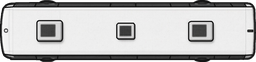
A bus is the same length and width as a mail semi. It drives at the same speed as other road traffic and takes road space the same way. It follows the same lanes and the same intersection rules as the other vehicles on Intersection rules, and it stops for people on, or waiting at, a marked crossing. A bus stops behind a car, and a car stops behind a bus. A bus waiting at the curb blocks its own lane. The body is light gray, with a dark window band and a blue stripe.
Hover a bus and press C. That is Take control, the same action as on a truck. W and S are throttle and A and D steer. Release control sends the bus back to its stop. If the stop is already finished, the bus drives on and leaves the map. See Possessing staff.
Placing a Bus Stop
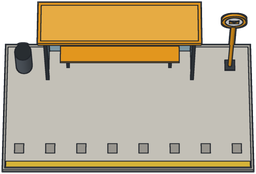
A Bus Stop is 6 tiles long and 3 tiles deep. Its whole long side has to sit right beside a road, so it turns to match the road. Anywhere else it is refused with "Must be beside a road". Stops work with any road orientation.
Up to 8 people wait on the stop, each on a spot of their own along the road side. The next 8 wait on the sidewalk in front of the stop. When a bus pulls in, the people on it get off first. Nobody waiting gets on until the last of them is off the bus.
A bus only serves stops on its own side of the road. It picks the cheapest stop it can drive to and still leave. Place stops on both sides of the road, or build a loop or a U-turn so one stop can serve every bus.
"Needs road access": the road beside this stop is gone. Buses skip it.
"No bus can reach this stop from <town>": that town's bus cannot reach a stop on its side of the road. Add a stop on the other side, or a loop or a U-turn.
A town with no road connected has no bus. Its riders walk.
Bus customers
Customers ride the bus too. A stop takes customers when people can walk from it to the Customer Service area, however far that is. The stop's info then reads "Serves customers". A stop with no walking path reads "No path to Customer Service" and serves staff only.
Buses do not bring extra customers. They only change how some customers arrive. A customer who would have come anyway may book the next bus from their town instead of driving or walking. The "Bus customers" control on Settings: Sandbox sets that share, from 0% to 60% in steps of 5 (default 30%).
The next control is "Town growth". It stays on the page when bulk contracts are turned off, and it is the growth rule only then. The choices are Off, Slow, Normal (the default) and Fast. Slow is half the usual pace, Fast is double, and Off stops growth. Towns never shrink on that path. Service Score still speeds a town up or slows it down. While bulk contracts are on, which is the default, growth uses "Bulk region growth" instead, and towns can shrink. See Regions and towns and Bulk contracts.
Each town's bus reaches its stop at 08:00, 10:00, 12:00, 14:00 and 16:00, and a last bus home comes at 18:00. A trip with nobody booked and nobody waiting is skipped. A trip more than 15 minutes late does not come, and anyone booked on it walks in instead. After 18:00 a bus comes when someone is waiting. When the stop takes customers, its info shows the next bus from each town it serves.
Customers step off the bus at the curb and walk to the lobby. After service, a bus customer walks back to the stop and waits in line facing the road. Each bus takes up to 8 of the people in line. When more are waiting, a second bus follows shortly after.
A customer who waits 2.5 hours gives up and walks home, and that town's Service Score drops by 1. If the stop is removed, or its town's bus can no longer reach it, the people waiting walk home with no Service Score change.