Utilities
Lights, machines, toilets, sinks and climate units all need power or water to work, and you bring both in yourself. Power, cold water and sewage are runs you paint from a town hookup on the map edge. Hot water is painted from a Water Boiler, not from that hookup. There is no player-built generator.
Cables and pipes are hidden in the normal view. Connection pads stay faintly visible so you can find the town hookup. To see the runs, press U, use the overlay button on the Utilities tab, or pick a utility paint tool. The button tip and the notice that the overlay is on list the colors: yellow is power, blue is water, red-orange is hot water, brown is sewage, and pale cyan is air. When several share a tile they sit in parallel strips.
Planned jobs show on the overlay before they are fitted. They do not carry power or water until the job is finalized.
Small cable is $25.00 per tile and large cable is $50.00. Small pipe is $30.00 per tile and large pipe is $60.00. Amounts render in the currency you picked (US dollars by default).
Painting a floor style does not pull up cables, pipes, lights or fuseboxes. Demolish does not either. Remove Utility, or Ctrl-drag on a matching run tool, is what takes a run back. Hold Ctrl and drag to pull matching cable, pipe or Air Duct back into spare stacks. Remove Utility clears runs and town connections in a rectangle. Connections are not refunded, so think before you remove one. Networks reconnect after a removal.
Shared runs
Several utilities can share one tile, and the overlay keeps each one readable. When wires, water, sewage or hot water share a tile, they draw as parallel strips in a fixed order: wires, then water, sewage and hot water. No strip covers another. Small and large of the same utility share one strip.
Water is blue, sewage is brown, and hot water is red-orange while the pipe is hot. A wire that is not on any circuit draws yellow. A wire on a circuit takes that circuit's color. Pipe with no hot water draws dim blue-gray once a plumber or Maintenance has fitted it. Planned hot water pipe draws faded red-orange.
At a corner the strips nest instead of crossing. Each keeps its side: The inside strip turns tight, and the outer strips wrap around it. A busy junction can still cross.
The ghost you see while placing or dragging uses the same strips as the runs it joins.
Air Duct is not one of those strips. It draws as one wide pale cyan band centered on the tile, under the other runs. See Heating and cooling.
Power
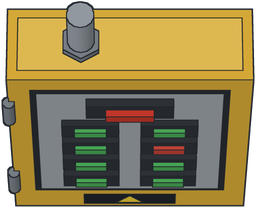
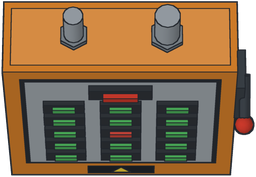
Power comes in from the town as mains cable, and each fusebox turns it into one circuit for your fixtures. Set it up in this order:
- Place a Power Connection on the map edge and pay for the town hookup.
- Paint Small Power Cable or Large Power Cable out from that mains. Mains cable does not use the waiting ghost. The site still has to be valid.
- Place a Fusebox or Heavy Fusebox on or next to that mains cable. You can order one before the mains are there. The ghost turns amber and reads "Waiting for a power connection". Hover the blueprint and the line reads "Blocked: Waiting for power connection" until mains are planned or built on or next to it. A planned Power Connection or mains cable counts only when it chains from a Power Connection. See When a crew cannot reach the work.
- Select the fusebox, then paint Power Cable. That stroke is stamped with the fusebox circuit. The game blocks the stroke until a fusebox is selected ("Select a fusebox before painting a circuit"). Cable that does not yet touch that fusebox can still be ordered. Those cells turn amber and read "Waiting for a power connection". They release when built or planned cable of that circuit chains back to the fusebox. A planned stretch that does not chain back does not count. Planned cable does not feed power.
A starter fusebox is 60 kW and 80 tiles of cable, and costs $400.00. A heavy fusebox is 120 kW and 160 tiles, and costs $900.00. One stroke cannot join two circuits. A circuit cannot grow past its tile cap, so when you need more load or more reach, add another fusebox rather than stretching one circuit.
Power is a zone of control, not "the fixture must touch the cable." Small cable covers 5 tiles in a king-move square. Large cable covers 8. Only cable on a fed circuit counts.
What needs power
- Light, Window AC Unit, Space Heater, Box Fan, HVAC Central Unit, Auto Postage Machine and the Water Boiler. Air Ducts and Vents use no power.
- High-Volume Sorter and X-Ray Machine stop when their circuit is not online.
- Sorting stations do not need power. That includes Sorting Station, Carrier Case, Package Sorting Station, Service Counter and Cage Window. They still work better in readable light, so light your desks anyway.
When power fails
A fusebox shows an alert when its circuit is in trouble. The table says what each one means.
| Alert | What it means |
|---|---|
| Overloaded! | Brownout. The circuit is still energized. Lights stay on but dim to about 42 percent. A long overload can trip the breaker. The notice reads "A circuit is overloaded and its breaker will trip soon. Cut the load or add a Fusebox. Click to focus." |
| Breaker tripped! | Powered equipment and lights on that circuit go dark. You can reset the fusebox once the load is back under capacity. |
| Too much cable! | The circuit is longer than the fusebox tile cap. |
| Needs mains! | The circuit is not fed from the town connection. |
| No cable! | Nothing in range is covering this fixture. |
| Still installing! | An electrician or Maintenance has not fitted the cable yet. |
Electricity is billed at day end from nameplate draw. Windows draw nothing.
A circuit near capacity (about 90 percent) can build heat and catch fire, so leave some room on every circuit. After that fire the breaker stays off until the blaze is out and the load is under 75 percent. See Disasters and weather.
Water
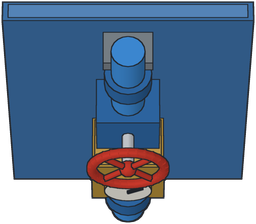
Cold water feeds your toilets, sinks and coffee. Buy a Water Connection on the map edge, then paint Small Water Pipe or Large Water Pipe. A small pipe serves its own tile and the orthogonal neighbor one step away. A large pipe serves a king-move radius of 2.
A Water Main is a plumbing panel (cost $400.00). You can order it before a water pipe is there. The ghost turns amber and reads "Waiting for a water connection". Hover the blueprint and the line reads "Blocked: Waiting for water connection". It releases when a water pipe or a Water Connection is built or planned on or next to it. That planned pipe does not have to reach the town connection. A bad site still turns the ghost red. It stays open while cold water reaches it. See When a crew cannot reach the work.
How much a pipe carries
Small pipe carries about 4 fixture-equivalents before pressure builds. Large pipe carries about 12. A small restroom (toilet, sink, coffee) fits a small trunk. A second restroom on that same small trunk does not, so give it a large pipe or a pipe of its own.
Sustained overload can burst the pipe. The notice reads "A water pipe burst because too many fixtures share it. Maintenance or a plumber repairs it. Use a Large Water Pipe or split the fixtures across two runs." The burst leaves a puddle on the orthogonal neighbors (one tile out). People move slower in it, and mail left in the water can soak. Janitors mop. There is no separate "clogged sewer" alert.
Hot water does not come from this connection. See Hot water.
Hot water
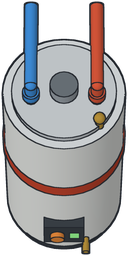
Sinks and the Coffee Station need hot water as well as cold, and hot water comes only from a Water Boiler. A boiler makes hot water only while it has power and cold water.
Range
Hot water travels 40 tiles along connected Hot Water Pipe from a working boiler. The distance is counted pipe tile by pipe tile, not in a straight line, so a pipe that winds around uses up range. Pipe past that distance is cold, and sinks and coffee makers fed only by cold pipe get no hot water.
Each working boiler covers its own 40 tiles. Where two boilers share a pipe, the nearer one counts. To reach rooms farther away, add another boiler near them. Small and Large Hot Water Pipe carry hot water the same distance.
The Utility Overlay (U) draws cold pipe dim blue-gray. Hover a hot water pipe to see its distance from a boiler. It reads "Boiler distance: 12/40 tiles", or "Too far from a boiler (42/40 tiles)" when the pipe is past the range, and pipe size changes only capacity and reach to fixtures. While you drag Hot Water Pipe, the build box shows the distance and turns red past 40 tiles.
Setting up a boiler
A Water Boiler costs $500.00. You can order it before a cold water pipe is there. The ghost turns amber and reads "Waiting for a water connection", and the job line is "Blocked: Waiting for water connection", until a water pipe or a Water Connection is built or planned on or next to it. It also needs power before it heats. It heats water only when it has both. When it has cold water and power, paint Hot Water Pipe from it to sinks and coffee makers.
Hot water pipes do not come from the town tap. They are fed by a live boiler. Small and large hot water pipes use the same fixture caps as cold water. A fixture still has to sit in the pipe's service radius: the pipe tile and the orthogonal neighbor for small pipe, or a king-move radius of 2 for large pipe. One live boiler is rated like one water connection: 8 fixture-equivalents. No live boiler means the hot-water network has no capacity. Extra live boilers add that rating together.
Sinks and the Coffee Station need cold water and hot water. Toilets do not use the hot water line. A boiler that is missing a supply says "Needs water" or "Needs power".
Hot water pipe is a plumber job. The Water Boiler is not on the plumber list or the electrician list, so it is installed as an ordinary object. Hired maintenance fits ordinary objects when they are on duty. A city builder takes that object when maintenance is not on duty.
Sewage
Toilets need a sewer as well as cold water. Buy a Sewage Connection on the map edge. Run Small Sewer Pipe or Large Sewer Pipe to toilets, or a short small-pipe lateral into the sewer under a road. Road tiles can carry sewage once a lateral connects. Toilets need both cold water and sewage. Sinks do not need a sewer connection.
Climate pieces on the same tab
The Utilities tab also holds the climate units and lights. How each climate piece works, with costs and coverage, is on Heating and cooling.
- Space Heater: serves 12 floor tiles, 15 kW while heating.
- Window AC Unit: goes in an outside wall or window, serves 15 floor tiles, 12 kW while cooling.
- Box Fan: local comfort within 3 tiles, 3 kW.
- HVAC Central Unit: 2x2 outdoor unit beside an outside wall. It heats and cools through Air Ducts and Vents.
- Air Duct: carries air 40 tiles along the duct from a working HVAC Central Unit.
- Vent: ceiling mount, serves up to 20 floor tiles of its room.
- Light: a ceiling-mounted object, like the Vent. See Ceiling mounts. Required in rooms without windows, and for early morning, evening, night and overnight even with windows. Daytime (08:00 to 17:00) near a window counts as natural light. Click places one. Dragging stamps a grid with three tiles between lights.